The Secret to Working on a Laptop in a Car Without Motion Sickness: Turn Your Commute into Office Hours
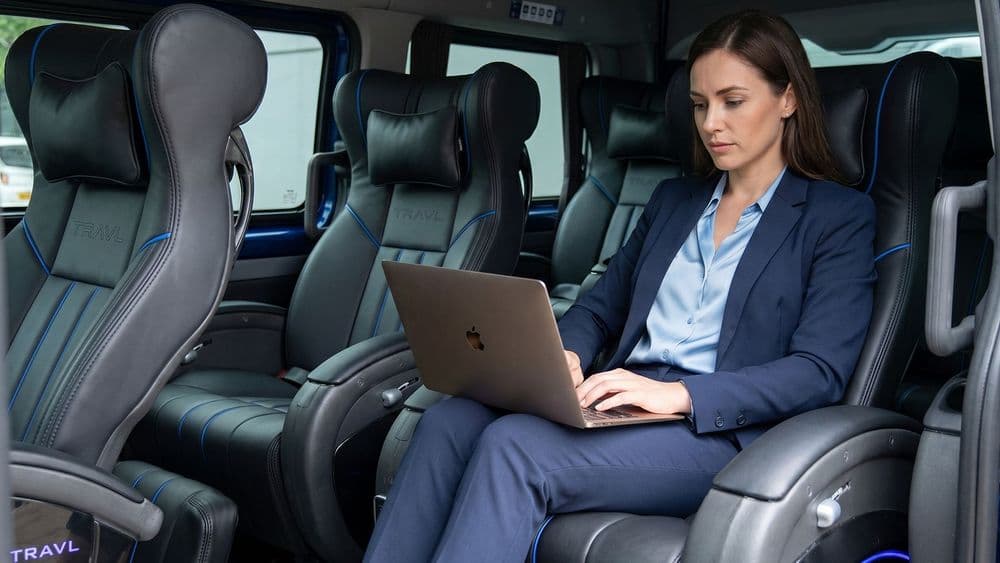
For many professionals and digital nomads, the 3 to 4-hour journey between Jakarta and Bandung is a golden opportunity to get work done. However, the biggest obstacle is often the nausea, dizziness, and cold sweats that appear the moment your eyes hit the laptop screen in a moving vehicle.
Forcing yourself to work while feeling nauseous not only ruins your focus and work quality but also leaves you feeling incredibly exhausted upon arrival. What should have been productive time becomes an agonizing physical burden.
The good news is that motion sickness while working is not impossible to avoid. With a combination of the right ergonomic techniques and a stable fleet, you can stay focused on hitting those deadlines. This article shares a tactical guide on tips for working on a laptop in a car without motion sickness, allowing you to truly transform your TRAVL cabin into a comfortable mobile office.
Why Do We Get Motion Sickness While Looking at Screens?
Medically, motion sickness occurs due to a sensory conflict in the brain. Your inner ear senses motion (the acceleration and vibrations of the car), while your eyes are focused on a stationary object: your laptop screen.
This mismatch of data received by the brain triggers a danger signal in the form of nausea. This condition is usually worsened by rough vehicle vibrations, sudden braking, or poor cabin air circulation. That is why choosing stable transportation is a deciding factor for your success in working on the road.
7 Tips for Working on a Laptop in a Car Without Motion Sickness
To stay fresh and productive while crossing the Cipularang Toll Road, apply these seven strategies:
1. Set Your Screen at Eye Level
Don't look down too deeply while typing. A hunched position puts extra strain on neck nerves and accelerates the onset of dizziness. Use a bag or a laptop stand so the screen is level with your gaze.
2. Use the 20-20-20 Technique
This is the most effective tip. Every 20 minutes of work, look away from the screen for 20 seconds at an object in the distance (the horizon or trees outside the window). This helps the brain resynchronize your perception of body movement with your vision.
3. Choose the Most Stable Seating Position
The strongest vibrations are usually felt in the very back row. If you plan to work, make sure to choose a seat in the front or middle row during online booking. These areas have lower oscillation.
Read Also: Check Now! This is the Best Jakarta-Bandung Travel for Executive Comfort
4. Activate Dark Mode & Enlarge Fonts
Reducing eye strain is vital. Use Dark Mode settings and zoom in on your text so your eyes don't have to work extra hard to focus amidst subtle vehicle vibrations.
5. Ensure Optimal Air Circulation
Stuffy air is a major trigger for nausea. Take advantage of the personal AC controls at every TRAVL seat. Aim the cool air toward your face or chest to keep your body temperature stable and your breathing fresh.
6. Watch Your Stomach
Working on an empty stomach or being too full after a heavy meal increases the risk of nausea. Consume light, dry snacks (like wheat crackers) and avoid carbonated drinks before opening your laptop.
7. Use Voice-to-Text Features
If the road starts to feel bumpy, rest your eyes but stay productive. Use Voice-to-Text features to dictate ideas or reply to emails without having to stare intensely at the screen.
8. Don't Force It!
If you start feeling tension in your neck or a slight headache, stop immediately. It’s better to rest and relax for a moment, then resume work once you feel better.
Read Also: 7 Advantages of Choosing TRAVL: The New Standard for the Most Comfortable Jakarta-Bandung Journey
Vehicle Factors: Why Fleet Stability is Key
Personal techniques are far more effective when supported by a stable vehicle. TRAVL designs its fleet to minimize motion sickness triggers:
Smooth Toyota HiAce Premio Suspension: Our latest units feature excellent shock absorption. Your laptop will remain stable without extreme shaking while the car is on the highway.
Controlled Safety (GPS Tracker): We install a GPS Tracker in every unit with a strict policy: the fleet speed will not exceed 100 km/h. Stable speed and smooth driving are the best ways to prevent sensory conflict.
- Spacious Captain Seats: With ample legroom, you can set the most ergonomic sitting position, ensuring smooth blood flow and sharp concentration.
Choosing a Schedule for Maximum Focus
Natural lighting helps the eyes stay oriented to outside movement. Therefore, working inside a car during the day (09:00 AM – 03:00 PM) is highly recommended over working at night, where there is minimal outside light to serve as a visual anchor for the brain.
By choosing TRAVL, you no longer have to choose between meeting a deadline or maintaining your physical health; you can have both in one calm, executive journey.
Don't miss the chance to stay productive at a more affordable rate by checking our promotions page. Ready to turn tomorrow's commute into a comfortable private workspace? Secure your favorite Captain Seat and book your travel tickets now!
Other Posts
TRAVL Point Diponegoro: Lokasi, Jadwal dan Cara Akses

Shuttle Bandung: Jadwal, Harga & Titik Keberangkatan

Tips Perjalanan Musim Hujan 2026: Sampai Tujuan Aman dan Nyaman

Travel Pasteur: Jadwal, Harga & Cara Pesan dari dan ke Pasteur

Travel Jakarta-Bandung Terdekat: Pilih Titik Keberangkatan dari Lokasi Anda
